Enable Anyone, Anywhere, To Read Any CAD File

View or open 3D files from all major MCAD systems to keep workflow moving

page-banner

Kubotek Kosmos View and Convert software is easily deployed across a range of devices, with options for read-only or conversion

Read, navigate & measure MCAD files

With Kubotek Kosmos CAD viewer programs, you will always be prepared for the next CAD file, no matter what it is. These applications require no additional CAD software and are designed with an intuitive interface, allowing any user within your team to easily view and interrogate files.

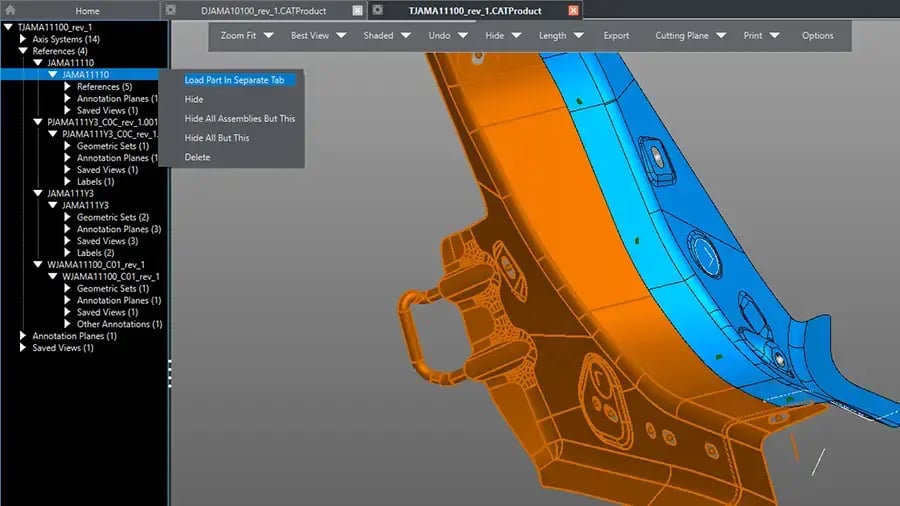
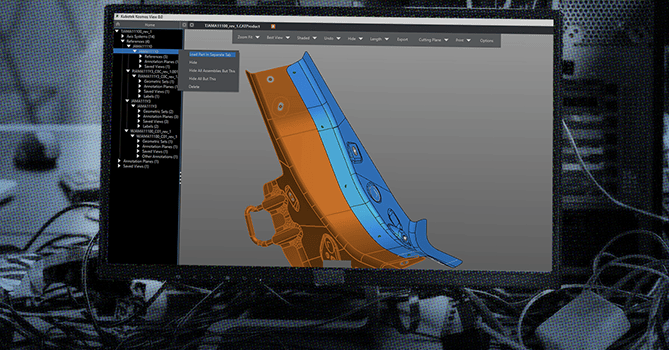
inset from user interface Kubotek Kosmos View MBD File Utility showing a precision manufactured aerospace part with PMI annotations
Powered by our next-generation Kosmos kernel

Both View and Convert utilities employ full multi-threaded processing guaranteed to bring a new level of speed when opening larger files. Windows, Mac, and Linux versions are available 

Two Choices: Read-Only or Convert

VIEW file utility

The View level licenses ensure that model data is unaffected by any user viewing the file. This local install, read-only program will never save an altered or duplicate version of the file, so there is no risk if you need to collaborate with another stakeholder.

CONVERT file utility

The Convert level licenses allow both straight pass-through of data as well as the ability to convert to popular formats. It also allows for modifications such as hiding the parts you don't want in your output file.


All levels are compatible with multiple platforms and can handle large files easily, with no data lost to translation.

photo illustration showing different 3D geometric wireframes

Batch Conversion Option

If your organization needs to convert an archive of files, we offer custom packages to suit your requirements, depending on file type and volume. Please contact our team about batch processing capabilities.

Readable Formats

  • ACIS - SAT, SAB
  • AutoCAD - DWG, DXF
  • CATIA V4 - MODEL, SESSION, EXP
  • CATIA V5 - CATPART, CATPRODUCT, CATDRAWING
  • CATIA V6 - 3DXML
  • Creo, Pro/E - PRT, ASM, DRW
  • ISO, ANSI - STEP, IFC, JT, IGES
  • Inventor - IPT, IAM
  • Kubotek Kosmos - KCM, KFW
  • NX, Unigraphics - PRT
  • Parasolid - X_T, X_B
  • Polygon mesh - STL
  • Solid Edge - PAR, ASM, PSM, DFT
  • SolidWorks - SLDPRT, SLDASM, SLDDRW
Visualize

Simple display commands and options for 3D models and drawings

Measure

Check distances, surface areas, and solid volumes

Output

Print, create image and PDF files, options to save to standard CAD

Multi-Platform

Both VIEW and CONVERT are available on Windows, Mac, or Linux

Visualization & Navigation Features

5 simple display modes are provided; shaded, wireframe (edges only), HLR, HLD, and shaded with 50% transparency. Faces with transparency properties in the original model will remain transparent in shaded mode. An additional Flat display mode helps test faceting.

To help users feel at home moving around the viewport, available settings modes allow quick setup of mouse-based view manipulation to match the default setup of major vendors. Certified support for 3Dconnexion motion controllers is also included.

All of the contents of files are listed in text form in a collapsible tree list. Highlighting is paired between the list and the graphics viewport to help find details.

The cutting plane function allows users to easily visualize the interior sections of complex parts. The DynaHandle axes can be cursor dragged, aligned to geometry on the model, or offset by user-entered distance or angles. (Not available in Limited)

Support Model-based Definition (MBD) processes by reading Product Manufacturing Information (PMI) including 3D geometric tolerances from most leading formats. See VIEW CAD Compatibility or CONVERT CAD Compatibility charts for detailed listings and license level information.

The Discover Assemblies option automatically discovers sets of geometrically identical 3D bodies. This capability can significantly reduce file size, and save time and potential errors when working with large assemblies which have been saved into a single CAD file.

The Bill of Materials option automatically creates a numbered table listing unique references or solids, their quantity, and name. A balloon annotation pointing to each part is also generated to help users identify each.

(Premium level only)

Geometry Measurement Features

Access basic measurements and size/physical properties of entities from the part tree list or from pop-up tooltips in the graphics window. Parameter information of machined hole, constant radius fillet, and general chamfer geometric features are also provided. Sets of identical features are collected as patterns.

Easily measure:

  • Distance between various type of entities and selected locations
  • Angle between two selected line/edges or 4 positions
  • Thickness of part at selected locations

(Not available in Limited)

Mass Properties calculates the volume, center of mass, moments of inertia, etc. of bodies and assemblies in the units selected by the user. (Not available in Limited)

This function colors the facets of solids according to their angle off of the user specified pull direction (axis). This supports finding undercuts or areas of the part which may be difficult to extract from a mold without special features or design changes. (Not available in Limited)

Create 3D solid volumes around selected parts to determine packaging or stock material size requirements. (Not available in Limited)

We're Here To Help

Contact our team with any questions or to request a quote