
Revision
The ordinary way to handle revised models works okay.
This way works perfect.
The ordinary way to handle revised models works okay.
This way works perfect.
ENGINEERING CHANGE REPORT AUTOMATION SOFTWARE
Revision can compare any parts or assemblies to identify differences at the feature / GD&T level. Plus, create detailed reports with just a click.
For pros who regularly encounter models authored in different CAD platforms, Revision gives you bullet-proof confirmation of exactly what's been revised.
The internal comparison function in major CAD platforms is designed to examine native files. In a multi-CAD workflow, that only goes so far. Revision covers it all.
Revision provides expert analysis of models and assemblies that a non-expert can easily generate. Get answers about changes before your engineering staff even starts asking questions.
Especially in advanced manufacturing settings, errors are costly. Single-digit percent chance errors can become five-figure mistakes (or more!). Be 100% sure.
You know those projects where getting the specific info you need isn't exactly smooth? Here's a simple step that captures details that aren't always made clear.
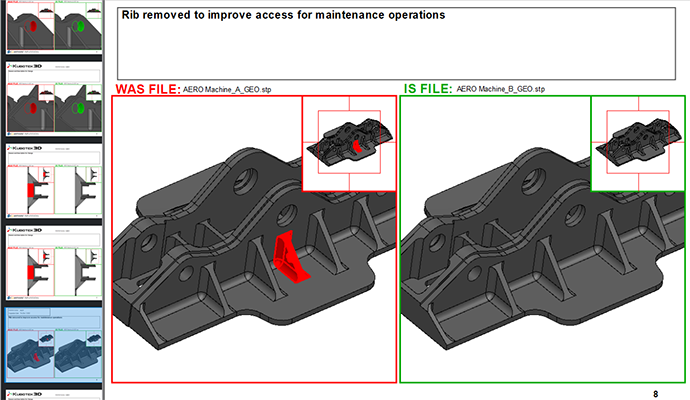
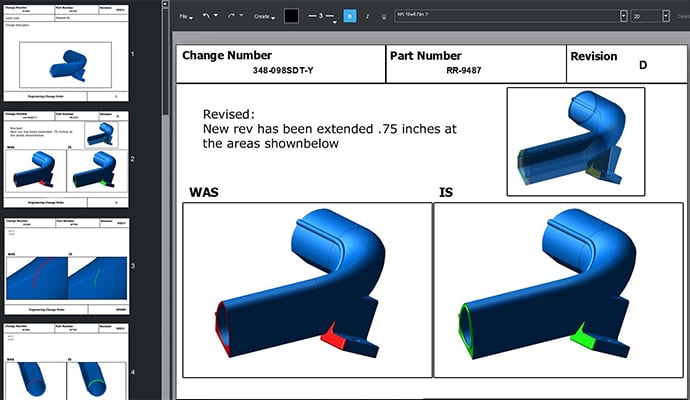
Generate a feature-by-feature summary of all changes between models. No more dragging screen captures into a slide deck. You have full 3D control of the model within the report to highlight exactly the details you want to communicate.
You specify the tolerance, then Revision will clearly highlight any and all differences between models. Those times when the client tells you about the big change but doesn't mention one extra little detail? You catch those.
Revision uses a proprietary geometric pattern matching built on our own 3D Framework modeling kernel. It checks the whole part definition, not just a feature tree or sampling of points. It also performs a full semantic check of 3D GD&T definitions to catch changes in PMI or MBD data.
The advanced translator technology that Revision is built on can read files from all major CAD databases, standards, and modeling kernels. When you receive models or assemblies authored in different format than your shop's CAD, your built-in comparison tool is going to be working at a disadvantage.
Revision's fully multi-threaded core enables it to make fast work of comparing complex assemblies. It also provides an intuitive method to review components individually – down to the individual face – to examine and report on changes in exacting detail.
To see Revision in action & learn more, watch this pre-recorded product intro webinar
If your shop receives customer files in multiple formats, Revision give you 100% certainty you catch every detail of every change.
New licenses of Revision now come bundled with a free month of MBD training through our collaboration with Action Engineering and their OSCAR program. OSCAR provides on-demand video and other materials to help your shop ramp up MBD adoption.
When your technical staff's time is in high demand, Revision helps keep project details clear by not requiring highly-trained users or occupying a CAD workstation.
With one click, you can generate a detailed report that provides an individual page for each difference found. It's also simple to combine multiple differences into a single report page if the differences relate to a repeated feature.
Within Revision, users have complete 3D control of how the differences between the models or assemblies are displayed. Make perfectly clear the exact location and nature of the differences found, with options for detail insets when referencing a complex object.
Rotate, zoom, switch to wireframe view: whatever it takes to best communicate details of the changes.
You can add annotations, plus customize the report template to include your logo, contact info, or whatever other details support your process.
Proprietary face-to-face geometric pattern matching analyzes the whole part definition within the user controlled tolerance. This strategy reliably finds the differences across all precise CAD models without the common failures and false positives of the Boolean approach, or missed areas inherent with the sampling of points approach.
To improve the visual clarity of results users can quickly group similar faces and sets of features together into a single difference or drag and drop them into a user-defined folder in the tree.
Measure the distance between entities, points, and positions and angles between two edges or faces, or 4 positions.
When the models to be compared are in a different orientations (typically for manufacturing setups), an accepted difference can be added to automatically or manually orient them to match.
Comparing only a portion of a file is easily accomplished by hiding the entities to be left out of the comparison.
A special mode for two sets of hierarchical CAD assembly files scans file names and headers and lists side-by-side results. Users can optionally geometrically compare a selected set of parts or launch processes to compare all parts. Quick side-by-side 3D graphical viewing is available to see differences in impacted parts.
Compare semantic differences in Product Manufacturing Information (PMI) including 3D geometric tolerances from multiple formats (Premium level only).
Review the Revision Data Exchange page for complete details on supported CAD formats.
Report pages for each difference found between the compared models can be automatically generated in seconds. Difference report documents are built in standard SVG files which can be viewed in Chrome, Firefox, Safari, IE, etc. Reports can also be printed and exported to PDF files.
View windows inserted into pages of a report allow paired 3D navigation to quickly get exactly the right zoom and orientation to help the reader understand each difference. Views can be either the Was part or the Is part, or a user-defined transparent overlay of both. An optional integrated Locator view indicates where the view window is on the full model.
Build report templates with background and/or logo images to match company or customer standards and automate the completion of title block information across all report pages.
Add labels, notes, and measurements to pages of your report for added clarity. Connect measurements directly to edges and positions on the 3D model.
If you are ready to put the widest interoperability and greatest 3D precision to work in your project or operation, learn more about our products and technology or contact us with your questions