
What's New: KeyCreator 2027

page-banner

KeyCreator 2027

The KeyCreator 2027 SP0 release is focused on delivering greater stability, compatibility, and performance across the platform. This release introduces major updates to the underlying ACIS and HOOPS technologies, enhances data translation capabilities, improves core modeling and drafting workflows, and includes targeted refinements to the user interface and licensing experience.

Platform Modernization

Updates to the ACIS modeling kernel and HOOPS graphics framework improve geometry support, graphics behavior, and overall system reliability.

Performance Improvements

Significant optimizations dramatically improve highlighted text rendering performance while reducing memory consumption when working with large assemblies.

Workflow Enhancements

New capabilities streamline everyday tasks, including:

  • Multi-profile cutting support
  • CPlane-relative DWG/DXF export
  • Custom text anchors for note tables
  • Load/save of face rendering material settings
  • Standard structural shape designations available for BOM

Translation and Compatibility Updates

Numerous import, export, and translation enhancements improve interoperability with a wide range of CAD formats and ensure better compatibility with current industry-standard systems.

These enhancements, along with continued investment in translator technology and workflow improvements, reflect our commitment to delivering a modern, reliable, and efficient CAD environment that meets the evolving needs of our users.

Workflow Enhancements

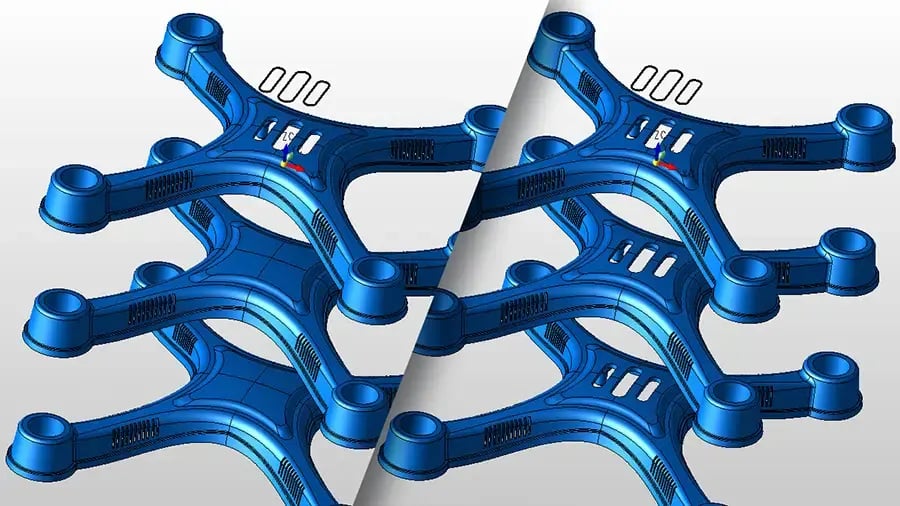
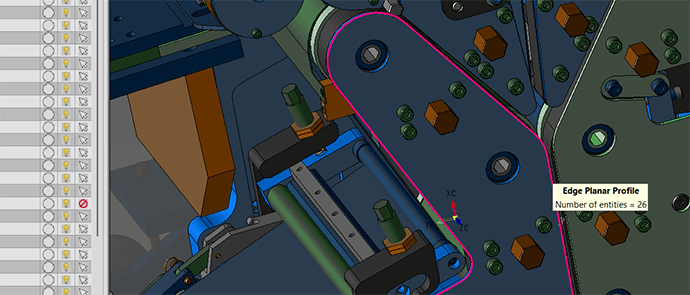
Photo illustration of KeyCreator CAD user interface showing new multi-level cut feature added to the KeyCreator 2027 release
CUT MULTIPLE SOLIDS SIMULTANEOUSLY

 The Pocket Solid Feature has been enhanced to cut through multiple solids simultaneously. This improvement makes it quick and easy to create cuts across multiple solids using a single planar profile, significantly streamlining the modeling process 
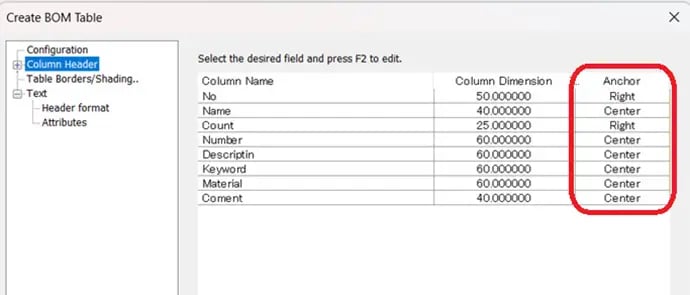
Inset image of Create BOM Table dialogue box from KeyCreator 2027 CAD software

BOM Table of Notes

Support for column-specific anchor alignment within tables has been added. Users can now define the anchor position for individual columns, allowing left-aligned, center-aligned, and right-aligned content to coexist within the same table. This enhancement provides greater flexibility when creating and formatting BOM tables 
Inset from KeyCreator CAD user interface showing how users can import standard structural shapes
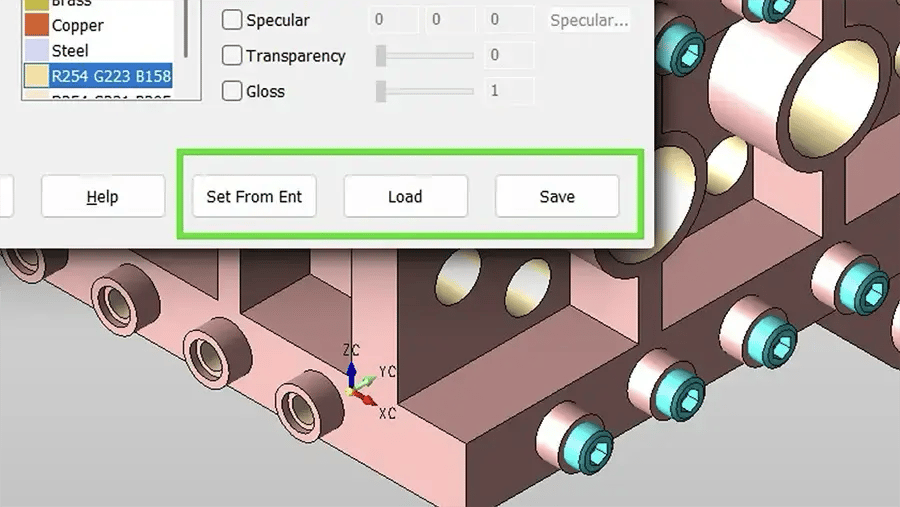
LOAD/SAVE OF FACE RENDERING MATERIAL SETTINGS

New options have been added to the Format Face dialog to allow users to easily save and load sets of material settings to/from text files. This allows users to more easily establish a named set of custom settings and apply them across CKD-based projects
Inset of screen capture from KeyCreator 2027 CAD software showing new DXF wireframe export functionality

DWG/DWF Export Options

Two new export options have been added: Indicate Exported Geometry Base Location and Export Entities Relative to Active Construction Plane. These options provide greater control over the location and orientation of exported entities.

For example, a selected wireframe profile can be exported consistently on the top view as a cutting profile for a laser or water jet cutter

Security Classification Warning Notifications

All KeyCreator products now display a warning when opening files that contain any of the following security classifications:

  • ITAR (International Traffic in Arms Regulations)
  • EAR (Export Administration Regulations)
  • CUI (Controlled Unclassified Information)

This warning helps users identify files containing export-controlled or sensitive information, promoting awareness and supporting compliance with security and regulatory requirements.

Interoperability

KeyCreator 2027 continues to provide industry-leading data exchange capabilities with support for all major 3D and 2D mechanical CAD native and neutral formats. This broad compatibility enables users to confidently import, view, edit, and re-use CAD data directly from their customers, suppliers, and partners, regardless of the originating CAD system.

By maintaining extensive translator support and continuously improving data translation accuracy and reliability, KeyCreator helps organizations streamline collaboration, reduce data conversion challenges, and maximize the value of existing CAD assets across diverse engineering environments.

KeyCreator 2027's enhancements provide users with:

  • Support for major 3D and 2D native CAD formats
  • Compatibility with industry-standard neutral formats
  • Improved translation reliability and data integrity
  • Reduced time spent recreating or repairing imported geometry
  • Greater flexibility when working in multi-CAD environments

This ongoing investment in data interoperability ensures that KeyCreator remains a powerful solution for organizations that work with CAD data from multiple sources and systems.

Updated Formats

 Write geometry to ACIS 2025 and 2026 SAT/SAB 

 Write geometry to V5-6R2026

 Read geometry extended to 2027 

 Read geometry extended 2703.1.11 

Read geometry extended to V13
Read drawings extended to V13

Read geometry extended to 2606.1700
Read drawings extended to 2606.1700

Read geometry extended to 39

Read geometry extended to 2705