
What's New: KeyCreator 2026

page-banner

KeyCreator 2026

KeyCreator 2026 features two significant additions to its functionality, as well as an assortment of minor enhancements and updates to file translators for all major CAD formats.

Level Tree Highlighting

The Level Tree now has an interface option and commands that makes it easier to identify which level in the level tree corresponds to which entities on the model. This interface improvement will be especially useful when working with complex models or assemblies. More details below.

Write to SolidWorks

The ability for KeyCreator 2026 to write files to the SolidWorks format enables our users to interface with PLM systems that integrate this file type, to take advantage of KeyCreator's productivity for certain specialized processes. It will also be of great value in multi-CAD work environments. Complete interoperability updates below.

Productivity Improvements

Dynamic Entity Highlighting

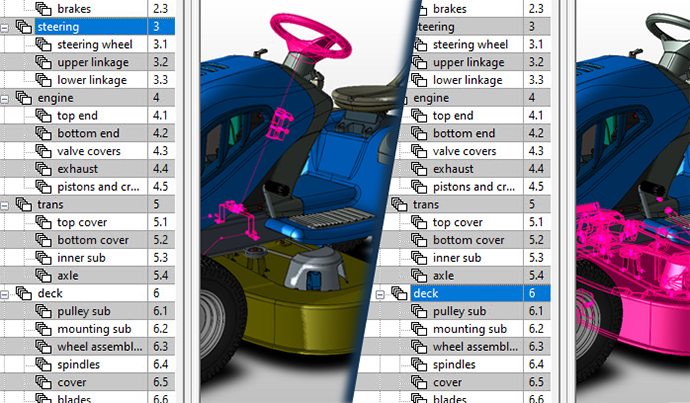
To find greater efficiency from KeyCreator's unique Level Tree file management tool, users can now choose to see which entities are contained in a specific level by selecting that level on the Level Tree.

This quick visual reference option makes it easy to work with complex models, or for an operator to quickly familiarize themselves with a KeyCreator model built by someone else.

Additional specialized functions of this feature are described below

inset from KeyCreator 2026 CAD user interface showing newly added Entity Highlighting Option feature of the Level Tree
Dynamic Entity Highlighting

Selecting elements in the Level Tree displays where they can be found on the model, enabling users to quickly understand a complex model's construction

Dynamic Entity Highlighting, cont.
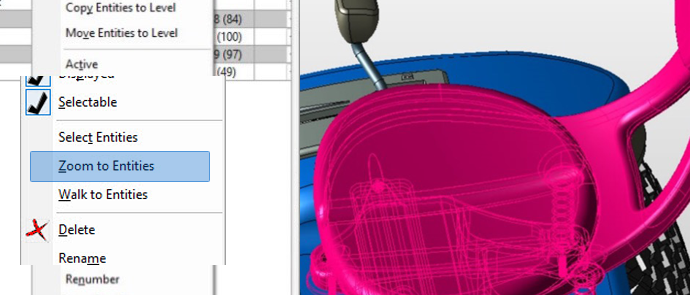
inset from KeyCreator 2026 CAD user interface showing the newly added Zoom to Entity option in the context menu

Zoom to Entities

From the Level Tree window, the user can access the "Zoom to Entities" function from the context menu. This will bring the entities on the selected level to the foreground of the viewport.
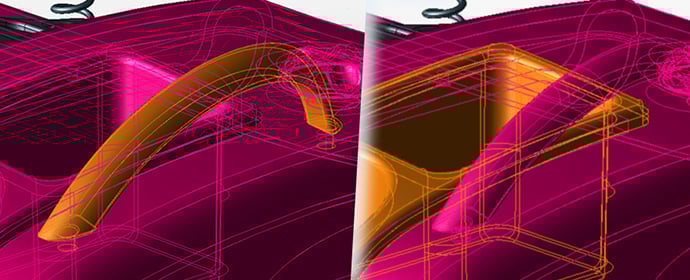
inset from KeyCreator 2026 CAD user interface showing the newly added Walk to Entity function

Walk to Entities

This function enables the user to advance the "Zoom to Entities" highlight sequentially to each entity within a selected level/sub-level. It has never been easier to assess how a model is organized.
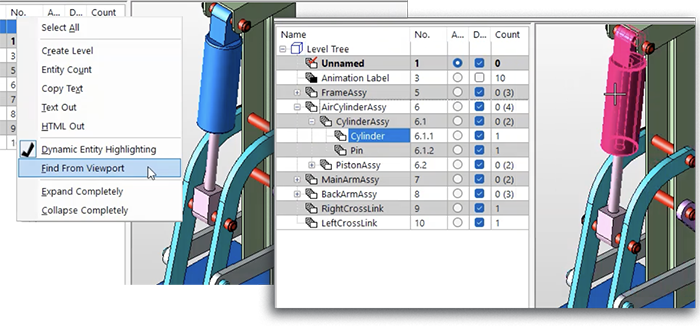
inset from KeyCreator 2026 CAD user interface showing the newly added Find From Viewport function in a context menu

Find From Viewport

With this function of Dynamic Entity Highlighting, the user can select an entity in the Viewport to reveal its location in the Level Tree. The function automatically expands sub-levels to give users complete clarity of the entity's level name and number.

Other Productivity Improvements
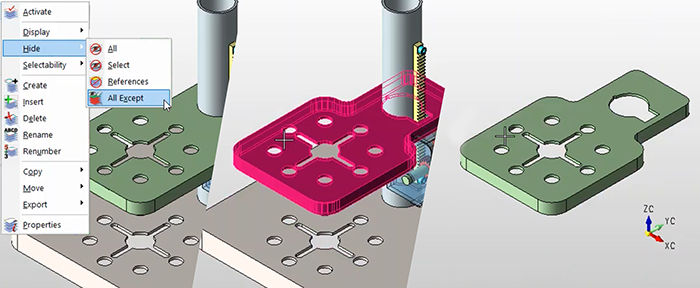
inset from KeyCreator 2026 CAD user interface showing the newly added Hide All Except function

Hide All Except

An additional level-based productivity enhancement added to KeyCreator 2026 is the "Hide All Except" function, under the "View" menu. Users can quickly isolate an entity within a model or assembly to more easily visualize geometry.
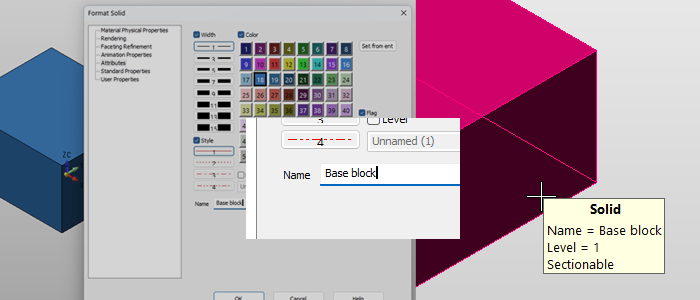
inset from KeyCreator 2026 CAD user interface showing the newly added Edit Entity Name feature within a dialoge box

Edit Entity Name

From attributes pages, users can now assign names to specific entities to distinguish between those with similar / identical geometry that might repeat within a model or assembly. Entity names are visible in the Tool Tip hover.

Detailing Improvements

Hole Table Layout Flexibility

The Hole Table function has been enhanced to separate a hole table into sections. This can be useful if the default table layout exceeds paper size or otherwise interferes with effective drawing construction.
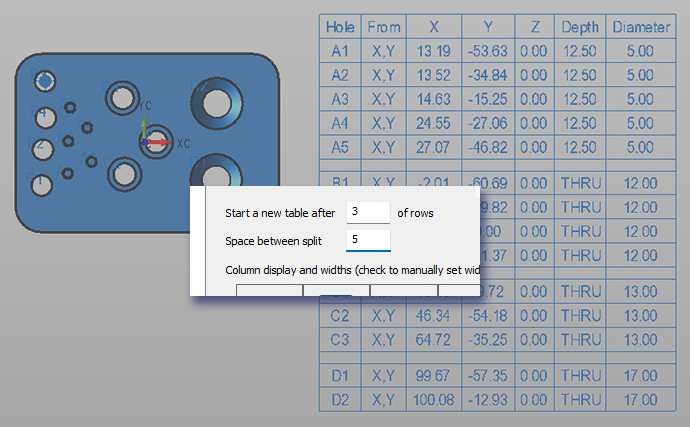
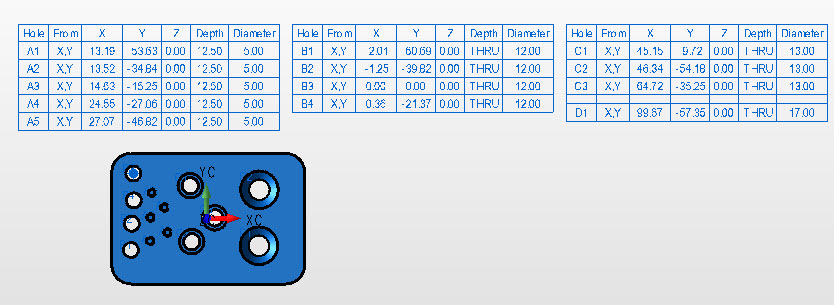
inset from KeyCreator 2026 CAD user interface showing the newly added Edit Hole Table dialogue box

inset from KeyCreator 2026 CAD user interface showing a hole table that has been revised using the new Edit Hole Table feature


Arc Dimensioning Options

A new Chain Arc Length Dimension has been added for greater flexibility in dimensioning arcs and splines. Users can create a series of dimensions for a given arc or spline. This function also allows the users to display the linear measurement along the arc/spline between two selected locations.

There are four options for how the dimensions can be displayed (listed clockwise from upper left): Circular plus radius, Circular plus arrow, Circular ANSI, and Radial
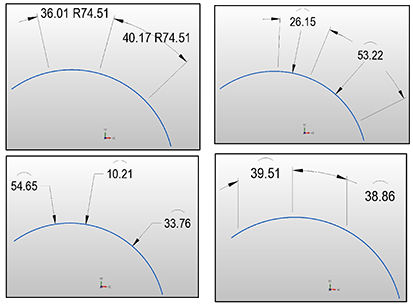
Radius-Types-Combined_A


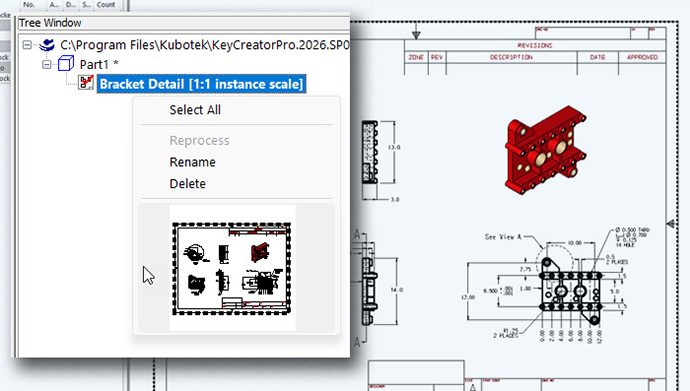
inset from KeyCreator 2026 CAD user interface showing the newly added preview image within a context menu

Thumbnails in Tree Window

When accessing parts and drawings from the Tree Window, users can use a RMB context menu to get a preview. This can simplify the search for a specific model, sheet, or drawing within crowded CKD files.

Other Improvements

High-Resolution Monitor Support — There was continued development to enhance KeyCreator's usability with high-resolution monitors, including enhancements to the File Properties dialog window and Tools Options Directories headers.

Interoperability

Updated CAD Translators

Listed below are the translators added or updated since the release of KeyCreator 2025. These updates are highlighted by two new interoperability capabilities:

1) Write to SolidWorks

KeyCreator 2026 adds the ability to write models out to the SolidWorks format. This SolidWorks to read the file as if it had been created natively. It has never been easier to integrate KeyCreator's specialized functionality into a multi-CAD work environment.

2) Emerging 3D format: glTF

Users may not be familiar with the glTF file type, a lightweight mesh format designed to enable web-based 3D viewing. This format has been adopted by major technology platforms including Microsoft, Occulus, and Google. Write functionality has been added to KeyCreator 2026; read more about glTF on Wikipedia.

Write support added for R21, R22, and R35

Read extended to 2026

Read extended to 2602.0.71

Write extended to V10.10

Read extended to 2412 (models & drawings)

Write extended to V37

Read extended to R2025x

Read extended to 2025

Write support added (mesh model only)

Read extended to 2025