
What's New: KeyCreator 2024

page-banner

KeyCreator 2024

The enhancements found in the KeyCreator 2024 release were primarily developed based on direct requests from numerous active KeyCreator customers from around the world. Like other recent releases, close attention was paid to increasing user productivity without interrupting traditional workflows.

Translator Support for MBD

A major theme of this KeyCreator release is continued improvements to manufacturing tolerance capabilities. Some of these improvements relate to CAD translator support for Model-Based Definition (MBD) which Kubotek continues to see grow in use, particularly in the aerospace segment. Another major new tolerance capability deals with more traditional drafting notations for mating cylindrical parts. Additional tolerance related improvements required adding several additional symbols for use in dimensions/ feature control frames as well as a few modeling function updates to better support face color/material attributes.

Tooling Industry Concerns

Specific enhancements to modeling functions were made to address the tooling industry and general layout requests. RGB colors are often used in the mold industry, so we improved their behavior in the Trim/Split functions. Section View performance and editing were addressed to eliminate unnecessary re-processing. This group includes:

  • Improvements to Boolean & trimming operations when using Materials/RGB colors
  • Extending surfaces with islands
  • Point Mass Center of Gravity coordinates are now associative
  • Elimination of unnecessary Section View processing
  • Improved selection of tangent edges

Improved Usability

Additional KeyCreator 2024 user interface enhancements address useability. Besides removing obsolete functions, making operations easier for new & long-time users by eliminating redundant prompts and messaging in various commands and updating terminology in dialogs. These include:

  • Create new Materials from settings on entities
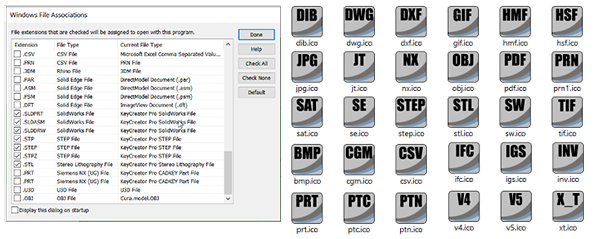
  • Assigning Windows file-type icons to any CAD/image file type linked to KeyCreator
  • Multi-Language UI support

KeyCreator 2024 continues supporting data exchange for interoperability with ten translators updated to their latest versions.

Enhancements to Detailing & Layout

KeyCreator 2024 marks a continuation of our updating standards support and making detailing improvements called for by user feedback.

Fit Tolerance Database for Cylindrically Mating Shafts/Holes

A new customizable FitTolSys.csv file provides a database of fit tolerances which is linked to dimension fit tolerance values and designation listings in format settings.
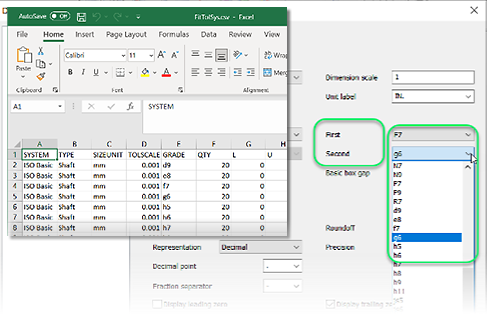
Inset of the KeyCreator 2024 user interface showing new feature related to fit tolerance values

The new options are flexible enough to support including fit designations for just one, or both the hole and shaft in a single dimension.
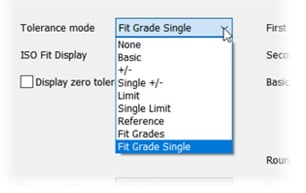
inset from user interface of KeyCreator 2024 showing the Fit Grade drop down menu

Related dimension formatting options can show the selected fit designations and automatic tolerance values in various positions to the right of the measured value.
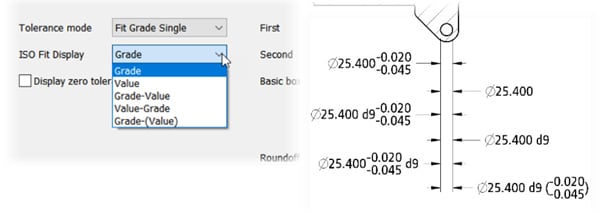
inset from KeyCreator 2024 CAD user interface showing display formatting options for Fit Grade

Additional GD&T Symbols

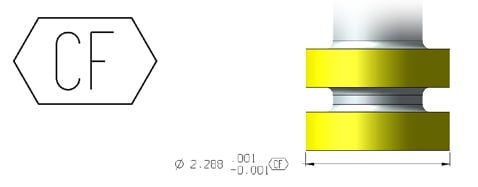
The Continuous Feature symbol, used to indicate that a group of disjointed features or surfaces are to be considered as one continuous feature, was added to the long list of codes available to insert into KeyCreator text.


The Unequally Disposed tolerance symbol (letter U inside a circle) is now available for use in surface or line profile feature control frame tolerance fields. 
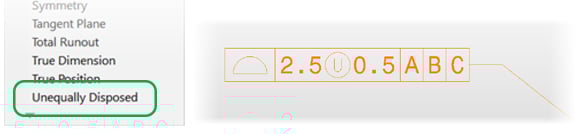
inset from KeyCreator 2024 CAD user interface showing the Unequally Disposed tolerance symbol

inset from KeyCreator 2024 CAD user interface showing the Continuous Feature symbol

Continuous Feature Symbol

In the example shown the CF symbol is the standard and concise method to communicate that the tolerance applies to both yellow surfaces, not just the one closest to the dimension.

Semantic PMI Data

The enhanced functionality allows users to edit, move, and copy PMI annotations as if they were created in KeyCreator.
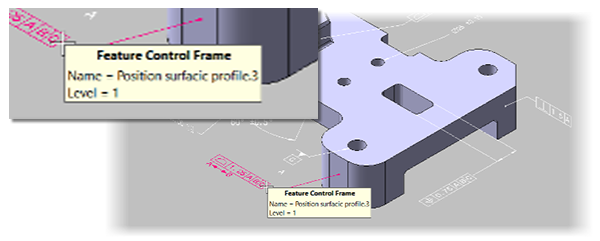
inset from KeyCreator 2024 CAD user interface showing the release's ability to read semantic PMI data as part of model-based definition (MBD) workflows

PMI as Detail Entity

PMI annotations included in a MBD file read into previous KeyCreator versions as General Detail entities, which were graphically accurate and human readable. For 2024 PMI annotations read from native CAD files as the appropriate KeyCreator detail entity (label, datum, feature control frame, etc.). 

Section View Editing and Settings

Working on Section Views is more efficient for users with two improved areas. Changes to non-geometric properties of a Section View no longer automatically triggers full reprocessing. These non-geometric edits include:

  • Cutting Plane attributes, letters, placement, and arrows
  • Section View label, projected location & attributes

Section View format settings used on a specific view reset back to default settings stored in the CKD file after each use/edit. KeyCreator 2024 has added an option to save format settings changes made to a specific view to become the new default in that CKD file. This saves users time and potential formatting errors when creating multiple section views in a drawing.

Productivity Improvements to Modeling Functions

Enhanced Trim/Split Functions

 The Connected Faces method in the Split with Surface command no longer merges away geometrically redundant faces. 
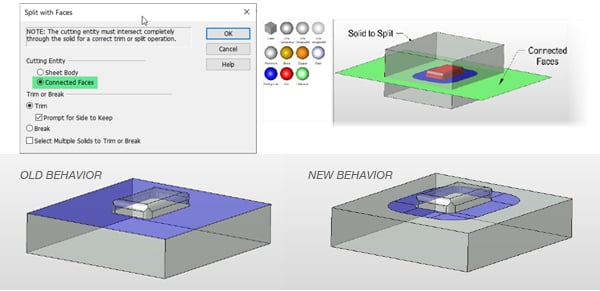
inset from KeyCreator 2024 CAD user interface showing updated handling of entities' assigned colors

Preserve Faces

The enhanced version now imprints the potentially valuable faces into the resulting body, saving significant modeling time over other modeling methods.


Cases that need extra faces removed can still be quickly cleaned up using Tools>Maintenance commands.
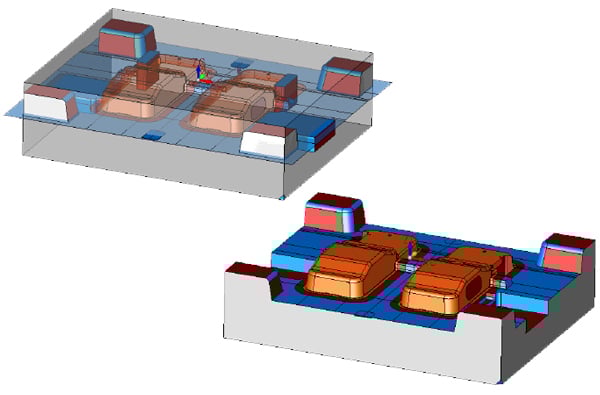
inset from KeyCreator 2024 CAD user interface showing updated handling of face material color properties

Face Materials/Color Migration

Several additional functions now maintain and transfer face materials/colors to the resulting body when the cutting body includes face-based materials/color settings. This speeds modeling by eliminating the need to reapply the required face colors. 

Extending Faces with Islands

Extending the edges of a trimmed surface with interior islands no longer requires the user to remove the islands first. The result maintains the islands unchanged.

Enhanced Tangent Edge Highlighting and Selection

Blend and chamfer modeling operations along complex edges require a contiguous smooth and tangent set of edges. This improvement aids users in identifying tangency or where additional edge selections are required. Highlighting and tool tips can now help quickly point out a potential design problem during a initial review of incoming models.

Associative Center of Gravity for Point Mass Bodies

For the 2024 version, Center of Gravity (CoG) coordinates for representative/simplified bodies are now associative to the geometry selected. This small enhancement provides a major upgrade to the mass properties system for large assemblies with numerous purchased components.

Designers can take advantage of KeyCreator’s core benefit of a simple data structure by modeling purchased parts with imported lightweight shell entities or dramatically simplified/featureless solids instead of the typical external part reference or precise editable solid. By maintaining an associative geometric location, the point mass/CoG will automatically update when that component’s simplified geometry is repositioned in the assembly.

This means that CoG and moment calculations for the whole assembly remain accurate without manual re-selection of point mass locations after point mass components are moved.

User Interface Improvements

Windows file association icons

inset from KeyCreator 2024 CAD user interface showing updated icons for Windows file associations

Easily identify file types

Specific file type icons are now assigned to the file type in Windows when KeyCreator users register them with the File Associations function in the KeyCreator Tools menu. This allows users to quickly identify different CAD and image files from the Windows File Explorer.

Multi-language support
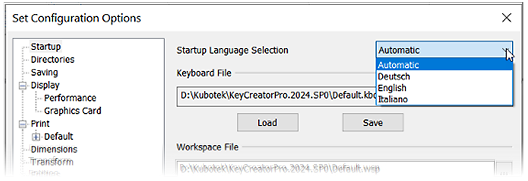
inset from KeyCreator 2024 CAD user interface showing newly added multi-lingual support

English, Italian & German

KeyCreator 2024 installers now include user interface text in three languages and supports simple switching between each on startup. By default, KeyCreator 2024 checks Windows settings for what language to use. An employee who speaks a supported language can quickly temporarily switch the UI to that language & back. This provides better support than many other CAD/CAM products which often require partial re-install to change language 

Interoperability

KeyCreator’s data exchange capabilities continue to support all major mechanical CAD 3D/2D native and neutral formats. Users can confidently re-use CAD data directly from a customer’s CAD system.

Updated Formats — File imports into KeyCreator 2024 have updated the ten formats listed below to support the latest versions.

Read & write extended to R2023

Read & write geometry extended to 2023

Read drawings extended to 2023

3DXML Read extended to R2023x

Read geometry extended to V10.0

Read drawings extended to V10.0

Read extended to 2024

Read extended to V10.7

Read geometry extended to NX2212

Read drawings extended to NX2212

Read & write extended to V35.0

Read geometry extended to 2023

Read drawings extended to 2023

Read extended to 2023

Read drawings extended to 2023